Our Scheduling Products: MachineScheduler and EquipmentScheduler
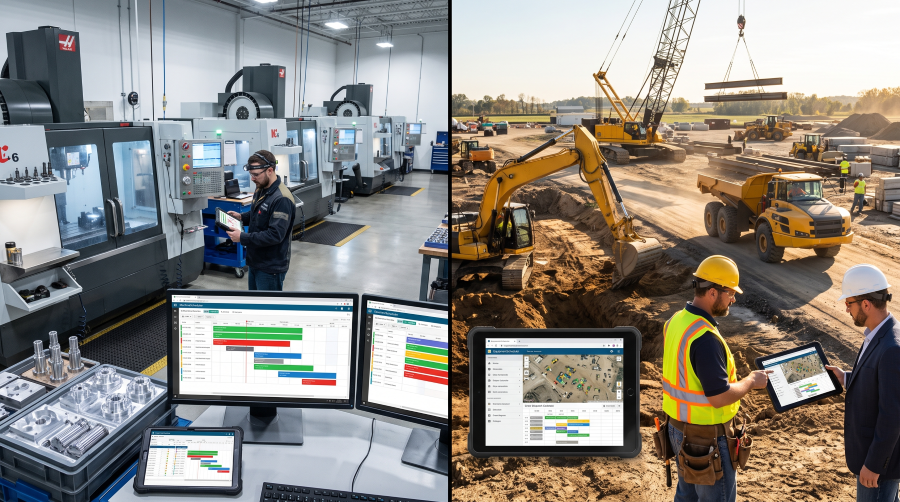
A production manager has 30 jobs on a whiteboard and a rush order just landed. A contractor's equipment manager has an excavator promised to two sites on the same Tuesday. Both are scheduling problems, and both usually live in a spreadsheet that has no idea when two things collide.
We built two products for these situations: MachineScheduler for job shops and EquipmentScheduler for contractors running fleets across several sites. This article explains what each one does, who it is for, what you can buy in each store today, and where each app stands.
Why scheduling made the list
Rovaryn builds software for B2B niches that are, as we put it, too small for enterprise vendors and too specialized for generalist platforms. (We wrote about that thinking in The Opportunity in "Too Small".) Scheduling for small manufacturers and mid-size contractors fits that description well.
A large manufacturer can buy an ERP with a scheduling module and a team to run it. A five-machine job shop or a contractor with a dozen pieces of equipment usually cannot justify that, so it falls back on Excel, a whiteboard, or a phone tree. Those tools hold a list. What they lack is the rule that matters most: one machine, one operator, one booking at a time.
Both products are built around that rule. Each starts from the same idea, catching a conflict before it is saved instead of after a crew is standing idle, and applies it to a different kind of operation.
MachineScheduler: machines, jobs and operators in a job shop
MachineScheduler is a cloud-based Gantt scheduling app for small-to-mid-size manufacturing job shops and CNC machining centers. Machines are the rows, jobs are the blocks, and you drag work into place on the board. The app enforces capacity as you go, so a machine cannot be booked twice for the same hours, and it checks operators the same way.
The problem it targets is familiar to anyone who has run a shop floor. Schedules kept on whiteboards or in Excel have no finite-capacity logic, no conflict detection and no view of which machines and operators are actually free. One rush order or one breakdown and the due dates start slipping one after another.
What the product is designed to do:
- Gantt board with conflict prevention. Drag-and-drop scheduling with machines as rows and jobs as blocks, with conflicts caught in real time.
- Operator roster. Skills and certifications, shift patterns, and detection when an operator is double-booked.
- CSV/Excel import. Bring an existing job list in rather than retyping it.
- Due-date indicators. Green, amber and red markers so anyone walking past can see which jobs are at risk.
- Utilization reporting and OEE. Machine and operator utilization reports, with an OEE dashboard on the Business tier. OEE (overall equipment effectiveness) is commonly calculated as availability × performance × quality: the share of planned time a machine actually runs, how close it runs to its ideal speed, and how much of its output is good.
- Daily schedule snapshot. A printable view of the day for posting on the shop floor.
Who it is for: production managers and shop supervisors at job shops with roughly 10–150 employees and 5–50 machines; CNC machining centers that need to track operator certifications; make-to-order manufacturers with complex operation sequences; and any shop where Excel scheduling stops working once concurrent jobs pass about 20.
EquipmentScheduler: equipment and crews across job sites
EquipmentScheduler handles the same conflict problem in a different setting. Instead of machines bolted to a shop floor, the assets move between sites. Instead of jobs in a queue, there are projects running in parallel.
It is built for general contractors tracking about 5–30 assets and their operators across several concurrent job sites. The questions it answers are basic, and they are often hard to answer from a spreadsheet: which machine is where, when it is free, and who is running it. When those answers are wrong, crews stand idle, rental bills grow, and an operator can end up dispatched to two sites at once.
What the product is designed to do:
- Visual fleet calendar. Weekly and monthly Gantt views of every asset.
- Conflict detection before the booking saves. For both equipment and operators.
- Asset management. Status badges for available, in use, maintenance and retired.
- Job-site views. Each site shows the equipment assigned to it and what is coming next.
- Operator roster with skills and certifications. On the Professional tier and above.
- Equipment request workflow. Requests route to a manager for approval.
- Utilization reporting. By asset and by operator.
- Reminders. Assignment reminder emails 48 hours ahead.
Certification tracking matters more in construction than it might first seem. For example, OSHA's crane standard requires employers to make sure each operator of covered equipment is trained, certified or licensed, and evaluated before operating it, and certification is issued by equipment type, or type and capacity. A scheduler that knows which operator holds which credential can flag a mismatch before the crane is on site. (This is general background, not compliance advice. The standard has exceptions and details of its own, so read it in full or ask a qualified adviser.)
Who it is for: project managers, operations directors and equipment managers at general contractors; civil and heavy-construction contractors with specialized equipment; contractors with about 10–100 employees and 5–30 assets; and multi-site operations that need one view of their equipment.
What is in each store today
Both apps are on a waitlist and are not open for sign-up yet. Both stores, though, are live now. Each sells spreadsheet workbooks and toolkits that tackle the same problems by hand, so a shop or contractor can start organizing its scheduling data now.
The MachineScheduler store includes, among others:
- Production Scheduling Gantt Template: a colour-coded Gantt timeline in Excel for up to 20 machines and 50 jobs.
- Machine Utilization & OEE Tracker: tracks utilization and OEE across machines.
- Machine & Operator Conflict Audit Workbook: scans scheduled operations for collisions.
- Rush Order Impact & Reschedule Calculator: a what-if model for the rush job that just came in.
- CNC Setup & Changeover Time Study Workbook: for timing and analysing changeovers.
- Operator Certification & Skills Matrix Tracker: maps operator proficiency by machine type.
- Excel-to-Scheduling Migration Guide: a PDF playbook for moving off spreadsheet scheduling.
- Machine Shop Job Traveler / Router Pack and a Daily Schedule Snapshot & Shop-Floor Posting Sheet for the floor itself.
There is also a Total Production Efficiency Bundle of three tools, and a MachineScheduler Complete Kit that collects the full set.
The EquipmentScheduler store includes, among others:
- Equipment Scheduling Master Tracker: a conflict-checked weekly fleet view that flags double-bookings.
- Weekly Multi-Site Equipment Assignment Planner: flags any machine promised to two sites.
- Construction Fleet Utilization Dashboard: turns assigned days into utilization and idle-day cost per asset.
- Equipment ROI & Cost-Per-Hour Calculator: cost per hour and rent-versus-buy break-even for each machine.
- Operator Certification & Availability Matrix: flags expiring certifications and double-booked operators.
- Equipment Move & Transfer Log with In-Transit Tracking and a Rented-Asset Return-Timing & Off-Rent Tracker.
- Printable Daily Dispatch Sheet & Morning Huddle Pack for the start of the day.
- Trade-specific kits: an Earthmoving & Grading Fleet Scheduling Kit and a Crane & Specialty-Asset Lift Scheduling Kit.
It also offers an Equipment Operations Starter Bundle and an EquipmentScheduler Complete Kit.
Start with the store
Both stores are live now. The apps are on a waitlist and not yet open for sign-up. A shop owner who buys a conflict-audit workbook gets something useful today, in the spreadsheet tools the shop already uses. If you would rather have the software, join the waitlist on the product's own site.
Which one fits your operation
A rough way to choose:
- Your work moves through fixed machines in one building, and the pain is sequencing jobs, covering shifts and protecting due dates. Start with MachineScheduler.
- Your assets move between sites, and the pain is knowing where each one is, who runs it, and whether you are paying rent on something that is sitting idle. Start with EquipmentScheduler.
Some businesses have both problems, such as a fabricator that also installs on site. In that case it helps to choose based on where the most expensive conflicts happen today.
Where to go next
Both product pages on Rovaryn summarize the products and link to their sites, stores and waitlists: MachineScheduler and EquipmentScheduler. You can see the other 21 products at /products. If you have a question about either one, contact us.