How Buying a Premium .com Through Escrow Works, Step by Step
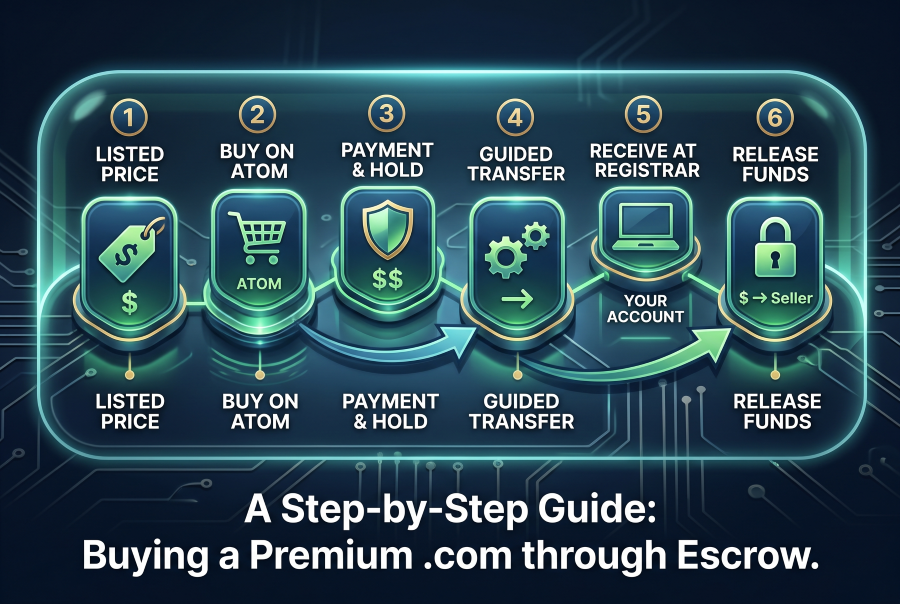
You have found the name. It is a clean .com, it says what your company does, and it has a price on the page. The part that makes most first-time buyers hesitate comes next: you are about to send several thousand dollars to someone you have never met, for something that lives in a database you cannot touch. This guide walks through exactly what happens between clicking buy and seeing the domain in your own account, using a purchase from Rovaryn as the example.
Why escrow exists in the first place
A domain sale has a trust problem built into it. If the buyer pays first, the buyer is exposed: the seller could take the money and never move the name. If the seller transfers first, the seller is exposed: the buyer could take the domain and never pay. Neither side has a good reason to go first.
Escrow removes that standoff by putting a neutral third party in the middle. Escrow.com describes the standard sequence in five steps: the buyer and seller agree to terms, the buyer pays into an escrow account and the payment is verified, the seller is then authorised to deliver, the buyer has a set period to inspect and accept, and only after acceptance are the funds released to the seller.
The point is that the money and the asset never cross in the dark. The buyer's payment sits with someone who will not hand it over until the domain has arrived, and the seller knows the money is real before giving anything up.
Step 1: The listed price
Every domain Rovaryn sells has its own page with a fixed price. Defrayment.com, for example, is listed at $5,999. That is the purchase price. There is no make-offer button and no negotiation on our pages, so the number you see is the number you pay.
A fixed price changes the shape of the purchase. With an unpriced name, the first stage is often an inquiry, a counter-offer and some back-and-forth before anyone talks about escrow. With a listed price, the commercial question is settled before you start, and the rest of the process is mechanics. If you want background on why premium names are priced the way they are, we covered that in Why Premium Domains Cost What They Do.
You can browse the full list at /domains, or narrow it by category, such as finance and fintech names.
Step 2: Buy on Atom
Each Rovaryn domain page has a Buy on Atom button. Purchases complete on Atom.com, which handles the payment and the transfer. Atom is a domain marketplace and also an ICANN-accredited registrar, as it states on its domain transfer page.
Clicking the button takes you to the domain's listing on Atom, where you check out. This is where you choose how to pay: in full, or, for buyers who would rather spread the cost, through a lease-to-own or payment plan (more on that below).
Step 3: Payment and the escrow hold
Once you pay, the funds do not go straight to the seller. They are held while the transfer happens, which is the escrow step described above. The seller is told the payment is secured, which is the signal to start moving the name, but the seller is not paid yet.
From the buyer's side, this is the moment the risk shifts. Before payment, you had nothing at stake. After payment, your money is committed, but it is committed to a neutral holder with instructions to release it only when you have the domain.
Step 4: The guided transfer
This is the step most people imagine will be complicated. In practice, it is mostly handled for you. Atom's How It Works page says that once you purchase a domain, its transfer specialists reach out, typically on the same business day; that in most cases they can move the domain to your preferred registrar; and that once the transfer details are confirmed with you, transfers are typically initiated to your account within one business day.
On Rovaryn's listings, we describe the whole guided transfer as typically taking 1 to 3 days from purchase to the name sitting in your account.
What "transfer" means depends on where you want the domain to end up. There are two common routes:
A change of account at the same registrar. If the domain is already at the registrar you use, the name can be pushed from the seller's account to yours. This is usually the quickest path.
A transfer between registrars. If you want the name at a different registrar, it moves using an authorisation code. ICANN describes the Auth-Code as a code created by a registrar to identify the domain name holder and prevent unauthorised transfers. The domain also has to be unlocked before it can move.
You do not need to master either route. The reason the transfer is "guided" is that someone on the Atom side tells you which details they need and when.
Two timing rules worth knowing
ICANN's Transfer Policy includes 60-day restrictions that can affect when a domain is able to move between registrars:
A domain generally cannot be transferred to another registrar within 60 days of a previous inter-registrar transfer.
After a change of registrant, registrars must apply a 60-day inter-registrar transfer lock, although the policy lets a registrar allow the registrant to opt out of that lock beforehand.
These rules are changing. ICANN's Transfer Policy Review recommends removing the change-of-registrant lock and shortening the other locks to 30 days, but the new rules take effect only once registrars implement them, so check with your registrar which version applies when you buy.
These rules exist to make hijacking harder, and they rarely get in the way of a normal purchase. They matter mainly if you plan to move the domain again soon after receiving it. If you do, ask about it before the transfer starts, not after.
Step 5: Receiving the domain at your registrar
When the transfer completes, the domain appears in your registrar account, under your name. Before you approve anything, check three things:
The domain is listed in your account, not just showing as "pending".
You are the registrant. The ownership contact should be you or your company, not the seller.
You can change the settings. Try opening the DNS or nameserver settings. If you can edit them, you control the name.
This check is the inspection part of escrow. Escrow.com's process gives the buyer a set number of days to inspect and accept or reject what was delivered, and if it is not approved, the buyer can raise a dispute. For a domain, inspection is quick, because it is a yes-or-no question: is the name in your account and under your control?
Once you are satisfied, a few housekeeping steps are worth doing on day one: turn on the registrar lock, set auto-renew, add two-factor authentication to the registrar account, and make sure the account email is one you will still be reading in five years.
Step 6: Release of funds
After the domain is confirmed as delivered and accepted, the escrow holder releases the payment to the seller. That is the end of the transaction. The seller gets paid only because you got the name, and you paid only into an account that would not release the money until you had it.
The sequence matters more than the speed. Even when the whole thing finishes within a day or two, the order of events is what protects both sides.
Lease-to-own and payment plans
Not every buyer wants to pay a five-figure sum in one go, especially before a company has revenue. Lease-to-own and payment plans are available on Atom for Rovaryn domains.
The mechanics differ from a one-time purchase in one important way. Atom's How It Works page explains that when you buy a domain on a Lease to Own plan, Atom holds the domain in an escrow account until it is fully paid off. Atom's team can still help you make changes such as nameserver updates, so you can start using the domain right after your first installment.
In other words, you get to build on the name straight away, but ownership transfers to you only when the last payment clears. Read the plan terms on Atom before choosing one, including the total cost over the plan's length and what happens if you stop paying.
A worked example (illustration only)
Say you are naming a payments startup and you choose a name listed at $6,000. Paying in full, you check out on Atom, the funds are held, a transfer specialist contacts you, the name lands in your registrar account a day or two later, you confirm it, and the funds are released.
On a payment plan, you make the first installment, point the domain at your site through Atom's help with nameservers, and launch. The domain stays held in escrow while you pay. When the final installment is made, the name transfers to your own registrar account and the steps from Step 4 onward apply.
The numbers here are round figures for illustration, not a quote for any particular domain.
Questions to settle before you click buy
Where should the domain live? Pick your registrar before you buy, so the transfer goes to the right place the first time.
Who is the registrant? Decide whether the domain belongs to you personally or to your company. Changing it later means another registrant change.
Is the name clear for your use? A domain purchase transfers the domain, not any trademark rights. Before building a brand on a name, it is sensible to run a trademark search in the markets you will operate in. This is general information, not legal advice; for a significant brand decision, talk to a trademark professional.
Full price or a plan? If cash flow matters more than immediate ownership, a lease-to-own plan lets you use the name now and own it later.
If you have a question about a specific Rovaryn domain before you buy, you can reach us through our contact page.
The short version
Buying a premium .com through escrow is a fixed sequence: a listed price, checkout on Atom, payment held in escrow, a guided transfer that is typically done in 1 to 3 days, a quick check that the name is in your account and under your control, and then release of funds to the seller. Escrow exists so that neither side has to trust the other first. Once you have seen the steps laid out, the purchase is less a leap of faith and more a short checklist.